wmProfile - Corporate Actions
Comprehensive search of the corporate action data segments for performed and upcoming corporate events.
Income
- Dividends
- Interest payments
- Investment distributions incl. all tax-relevant details on the income (cash and retained)
- Other payouts
Conversions
- Mergers
- Option conditions
- Conversion rights
- Liquidations
- Acquisition and buyback offers
Capital measures
- Capital increases
- Unbundling
- Subscription rights
- Conversion rights
- Offers for sale
- Subscription offers
- Splits
- Stock dividends
General meetings
- Regular / irregular general meetings
- Meetings of creditors
- General meetings
- Shareholder meetings
- Interim reports
- Annual press conference
Final maturities
- Maturities
- Drawings
- Terminations
Search mask Corporate Actions
The search function performs a limitation of the corporate actions to be selected by means of a timeframe. The definition of the timeframe depends on the type of measure and considers the following WM date fields:
Income (Segment E)
- ED007 Ex date
- ED020 Record date
- ED021 Payment date CBF
- ED022 Payable on CBF
- ED031 Coupon due date
- ED060 Inflow date
Conversions (Segment U)
- UD025 Ex date
- UD016 Conversion period
- UD018 Payment date
- UD027 Record date
- UD034 Detachment date
- UD193C CASG effective date
- UD193B Durable Medium effective date
Capital measures (Segment K)
- KD018 Ex date
- KD014 Subscription period
- KD019 Payable date
- KD032 Record date
- KD013 Detachment date
General meetings (Segment H)
- HD008 HV/GV date
- HD017 Document request period
- HD010 Last transfer date
- HD011 German Federal Gazette publication date
- HD023 Shareholder survey date
- HD024 Shareholder survey deadline
Final maturities (Segment V)
- VD009 Maturity date
- VD010 Payment date
- VD049 Ex date
- VD048 Record date in VVK
- VD007 Drawing / announcement date
- VD033 CBF international deadline
Exclude cancelled events
In addition to the period definition, the exclusion of cancelled events ☑️ is another search criterion for the targeted restriction of search results.
A cancelled event exists when the status of a corporate event contains one of the following expressions:
- S = Cancellation of entire announcement
- T = Cancellation of entire announcement due to ISIN change
- U = Cancellation due to duplicate/renewed publication
The status of a corporate event is reflected in the following WM fields:
- Income:
ED001 Payment status (Table: E13) - Conversions:
UD001 Conversion status (Table: U25) - Capital changes:
KD001 Capital measure status (Table: K12) - General meetings:
HD001 Meeting or announcement status (Table: H25) - Final maturities:
VD001 Drawing or calling status (Table: V11)
Corporate events without dates
For certain Corporate Actions, the WM date fields listed above are usually not populated. Some examples of such corporate events are:
- Conversions (segment U): Amendments to the contract terms in connection with the durable medium
- Conversions (segment U): Insolvency proceedings
- Capital adjustments (segment K): Changes to the commercial register, e.g. entries in the commercial register due to amendments to the articles of association
- Shareholders' Meetings (segment H): Class Action
Such corporate actions can be displayed using the functionality Include events without date ☑️.
If this search function is activated, corporate actions are also taken into account and displayed in the hit list which do not (yet) contain any information in the WM date fields listed above. Nevertheless, these corporate events may contain a corresponding date in other, less common WM date fields or in the general text (such as KD998).
Note:
To search for corporate actions without a date, an ISIN, a WKN or a position group is required as a search criterion, in addition to the period specification.
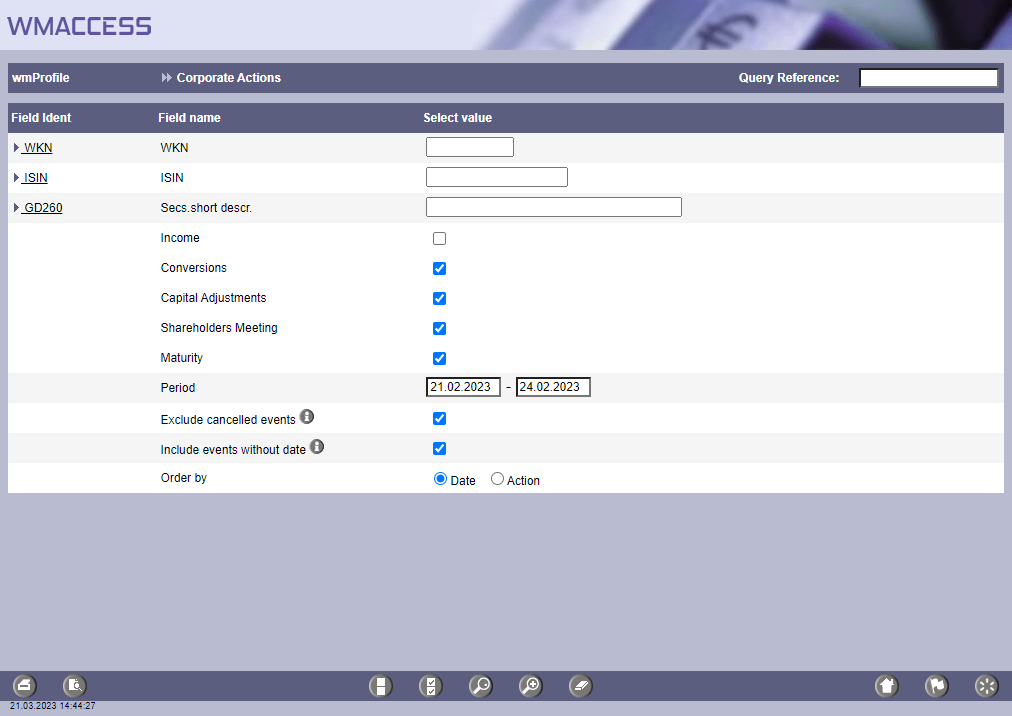
Search mask Corporate Actions. For each type of measure, a checkbox ☑️ for inclusion / exclusion is available. By default, cancelled events are excluded and events without date included. This can be changed by deactivating the associated checkbox.
Selection of sorting
In addition to the search criteria, the sorting of the hits can also be determined. The hit list can be sorted either primarily by the respective date or by the type of measure (action), whereby events without dates / deadlines are considered last in the respective sorting order.
Hit list Corporate Actions
The hit list itself contains an overview of the corporate actions found for the entered search criteria. Besides the measure type as well as ISIN, abbreviation and WKN, also the date fields are displayed analogous to the meaning of the search mask.
Since the hit list column "Date" is only displayed once per hit, this column contains the first date in the sequence of date fields listed per type of capital measure / segment.
The conversion period (UD016) and subscription period (KD014) are not included in the date column and are shown as period from/to.
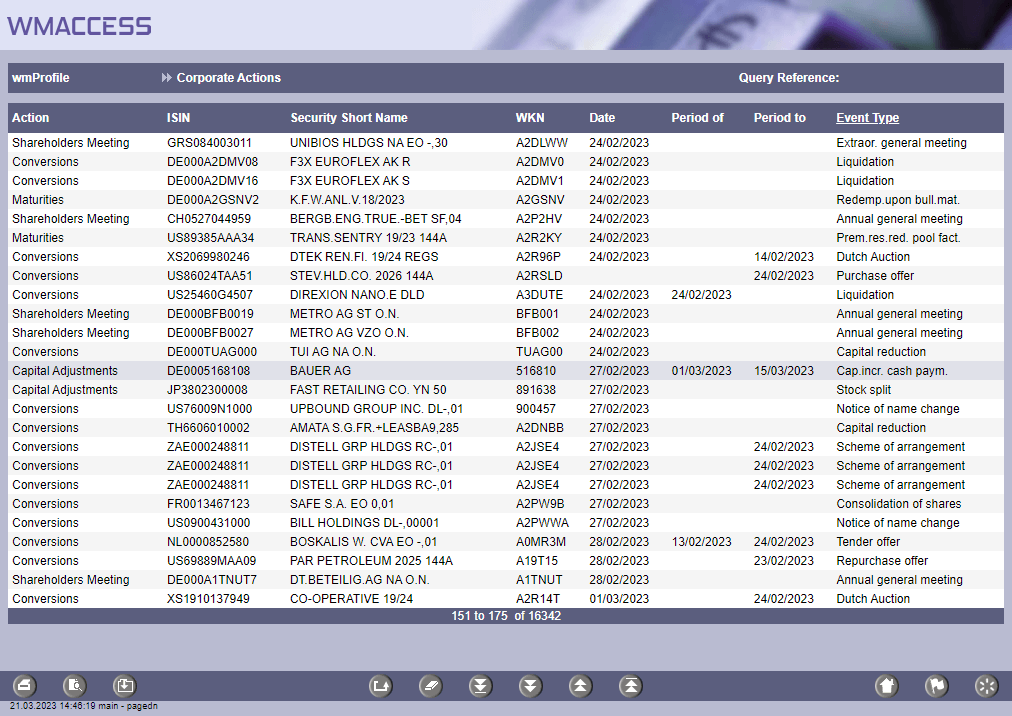
Hit list Corporate Actions for the overview of the corporate actions found.
The last column of the hit list with the title Type of event contains a sub-classification of the corporate event depending on the type of measure and are represented by the following WM-Fields and associated WM-Tables:
- Income:
Dividend payment type (Field: ED005 / Table: E02) - Conversions:
Exchange/cash compensation/payment type (Field: UD006A / Table: U51) - Capital changes:
Capital measure type (Field: KD005 / Table: K01) - General meetings:
Type of shareholders' meeting (Field: HD006 / Table: H02) - Final maturities:
Redemption type (Field: VD005 / Table: V01)
The status of a corporate event is displayed in addition to the type of event, once the Toogle function is executed.

A click on the headline of the last column activates the Toggle function ...

... and the window for the selection of the new information is displayed. Then just click on Status.
Alternative: [Alt] & [+] or [-] to scroll forward or backward.
The values of the Status column depends on the type of event. See also: Overview of the status WM-Fields with the associated WM-Tables

The comprehensive search of the corporate actions with the query profile "Corporate Actions" is especially suitable in combination with the portfolio-related query function in order to create an overview of upcoming corporate actions for the next days or weeks for stock instruments.
Detail display of a corporate event
After selecting a data set from the hit list, all not empty data fields of the relevant segment are displayed - analogous to the query profiles in wmView.
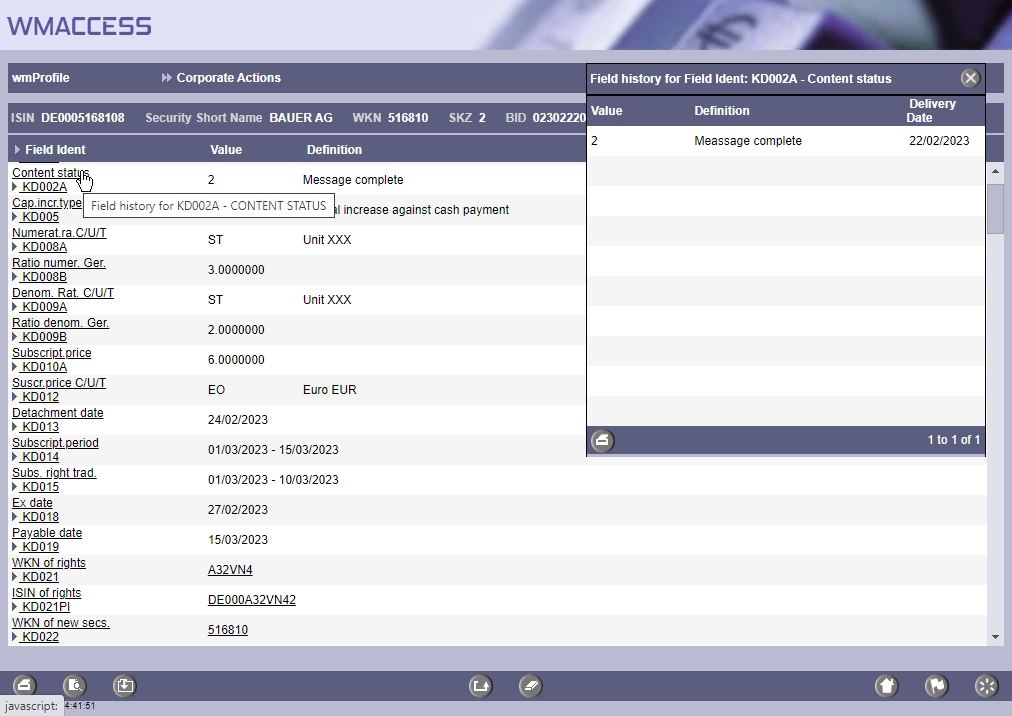
Detail display of a corporate event with all available detail information.

Test our products with real data. This test access is nonbinding, risk-free and without charge.

Sign up for productive use.


WMACCESS and www.wmaccess.com
Copyright © 2024 CPB Software (Germany) GmbH.